Angle
Id prefix: ANGL · Elements: exactly two · Selection filter: FACE / EDGE · Entry 5 of 16 in the panel's + dropdown
Angle holds a turn — Distance's rotational counterpart, and the other constraint that carries a number and a viewport handle. Its graphic is a swept arc, and dragging the arc's handle edits the degrees live.
Like Parallel it is orientation-only: it turns the part and leaves its
position alone. A new Angle created without a value adopts the orientation the parts already
have; one created with a value turns the part to it. Either way it captures a rotation
axis from the selected directions. That axis follows the first component and is
saved with the constraint, so negative values turn in the opposite direction and
angles above 180° retain their rotation sense. The signed angle measures the
second direction projected into the plane perpendicular to this axis. At an
initially parallel pair, a perpendicular reference axis is chosen deterministically.
Zero and 360° have the same orientation but retain their entered values.
The exterior toggle uses 180° − angle in this signed convention.
For two nonparallel planar faces, the arc is centered on their infinite intersection line. Its arms run along the face planes, with the start arm pointing toward the first selected face. The sweep still measures the signed angle between the face normals: when that angle is supplementary to the visible opening, the end arm follows the extension of the second face. Dragging that arm edits the same signed angle shown in the dialog (supplementary-remapped with Exterior angle enabled).
Parameters
| Parameter | ||
|---|---|---|
elements | two direction-bearing elements (face / edge) | The pair to hold at an angle. |
angle | number, default 90 | Signed target angle in degrees, including the full 0–360° range. Expression-capable. |
exteriorAngle | boolean, default false | Measure the exterior (supplementary) angle instead. |
limit | boolean, default false | Limit mate: hold the angle anywhere between minimum and maximum instead of at angle. |
minimum | number, default 0 | Limit mate: the smallest allowed angle, in degrees, in the same convention as angle (signed; exterior when exteriorAngle is on). Expression-capable. |
maximum | number, default 90 | Limit mate: the largest allowed angle. The range runs from minimum to maximum counter-clockwise about the angle's axis. |
Limit
With limit on, the angle is free anywhere in the range and the solve only steps in at the ends: a hinge that may swing from −30° to 60° stays where you leave it inside that range, and a drag that tries to turn it further stops at the end it is pushing against. The row reads Satisfied … Limit −30 to 60 while it is inside the range. With limit on, the form shows minimum and maximum in place of the single target, and the viewport arc is not draggable: a range has no single value for it to edit. A minimum above the maximum is refused with a message on the row.
Walkthrough
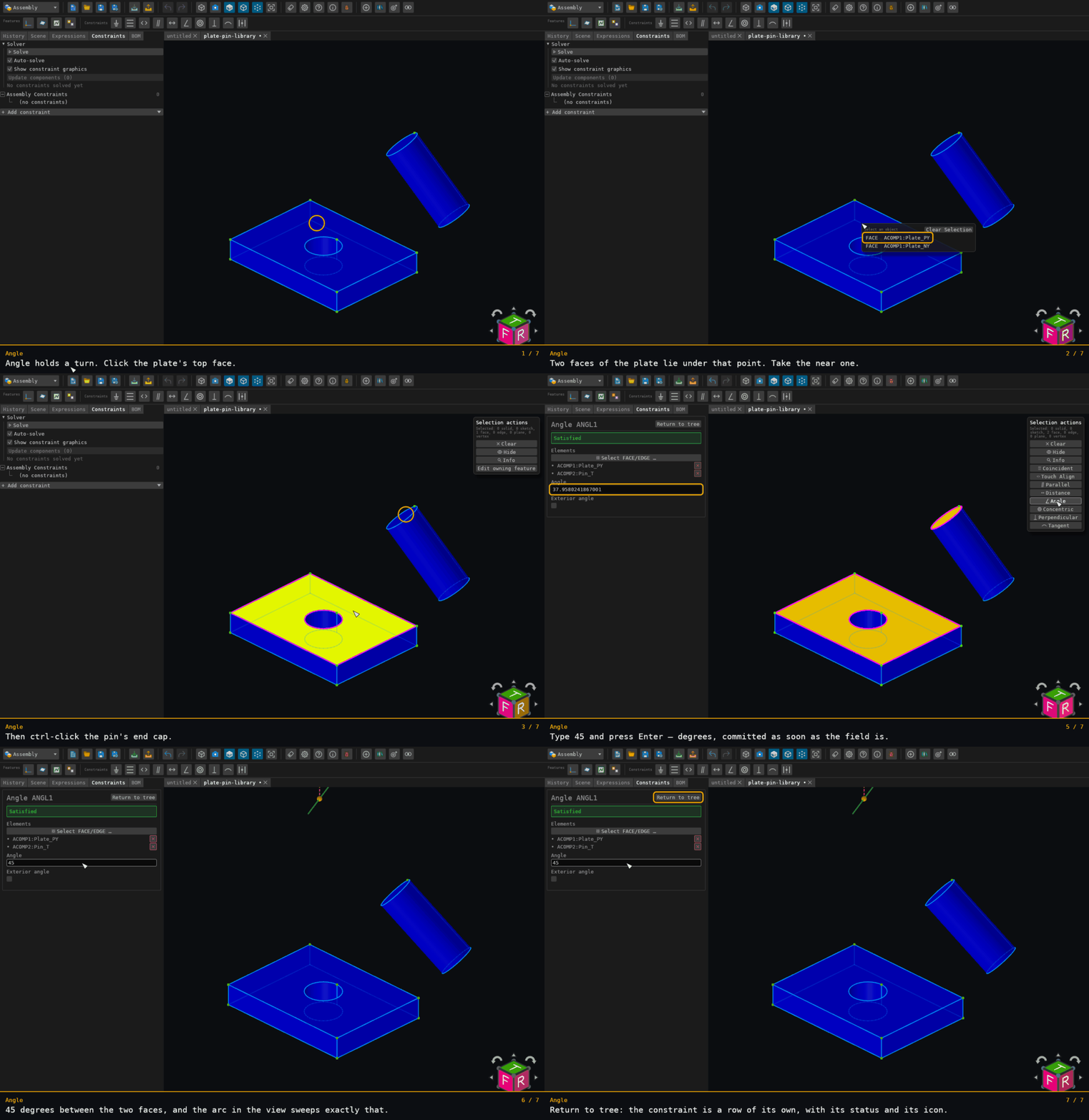
The plate's top face and the pin's end cap — the same pair as Parallel and Perpendicular — typed to 45°. The arc sweeps exactly that, and the pin's translation comes out unchanged: an angle is a turn.
Offered for two elements on two distinct components — see where constraints are offered.