Families and Templates
A model document is one of three classes, and its file extension says which:
| Extension | Class | Inserted into an assembly |
|---|---|---|
.nbrep | Part — every ordinary model, including imported parts and the parts a family or a template makes. | Placed as it is. |
.fbrep | Family — a parametric model plus a table of every size or configuration it comes in. | Never placed itself: you pick one of its members, and that member is placed. |
.tbrep | Template — a parametric model whose marked expressions you set each time you use it. | Never placed itself: you name a new part and set the inputs, and that new part is placed. |
Extensions are matched in any case and written lowercase. The class is also stored inside the document, so a family you have not saved yet is already a family.
Choosing the class
- File directly lists New part, New family and New template; each opens its class in a new tab. The toolbar's plain New command makes a part.
- Save As has a Save as dropdown —
Part (.nbrep),Family (.fbrep),Template (.tbrep)— that starts on the current document's class. It is the only way to change a class: saving a part as a family writes a new.fbrepbeside it and leaves the.nbrepas it was.Savealways keeps the file and its class. - A family and a part can share a name:
bolt.fbrepandbolt.nbrepare two files. In the file lists a part shows without its extension; a family or a template shows its extension.
Families (.fbrep)
A family holds a table, one row per member:
- Part number — typed by you. It is the member's file name: row
M6x20makesM6x20.nbrep. - Revision — kept in the table for a future revision-controlled store. On the file system it does nothing.
- Description — goes into the member's part attributes, where the BOM reads it.
- One column per expression the rows set, for example
length. A cell is expression text (20,length_base * 2). It replaces that expression's definition in the member, so later expressions that use it follow. An empty cell keeps the family's own value.
You edit the table while the family is open, in the family table editor. The eye on a row previews that member on the model without changing the family.
Generate
Generate writes every row as <part number>.nbrep in the family file's own folder.
Each member is an ordinary part: the family's model with the row's values in its
expressions, and the row's part number and description in its part attributes. A family must
be saved before it can generate, because the members are written next to its file.
- Unchanged rows are skipped. Each member records which family made it, from which row, and a fingerprint of that row and of the family's model. Generate rewrites a member only when its row changed or the family's model changed (a feature, an expression, anything but the table). Editing one row and generating again rewrites that one file.
- A row that cannot be written is reported, with the reason, and the other rows are still
written. The reasons are real ones: a part number that is not a valid file name, two rows
with the same part number, a file the system will not let the app write, or a value that
does not evaluate (
nope, an unknown name). - Generate checks the expressions, not the geometry. A row whose values evaluate but break a feature (for example a negative length) is still written. Open that member and its feature shows the error.
- An existing file is overwritten, even one you made by hand with that name. A family owns the part numbers in its table.
- Removing a row never deletes its member. The file stays where it is, and every assembly that uses it keeps working. Adding a row writes nothing until you Generate.
Placing a member
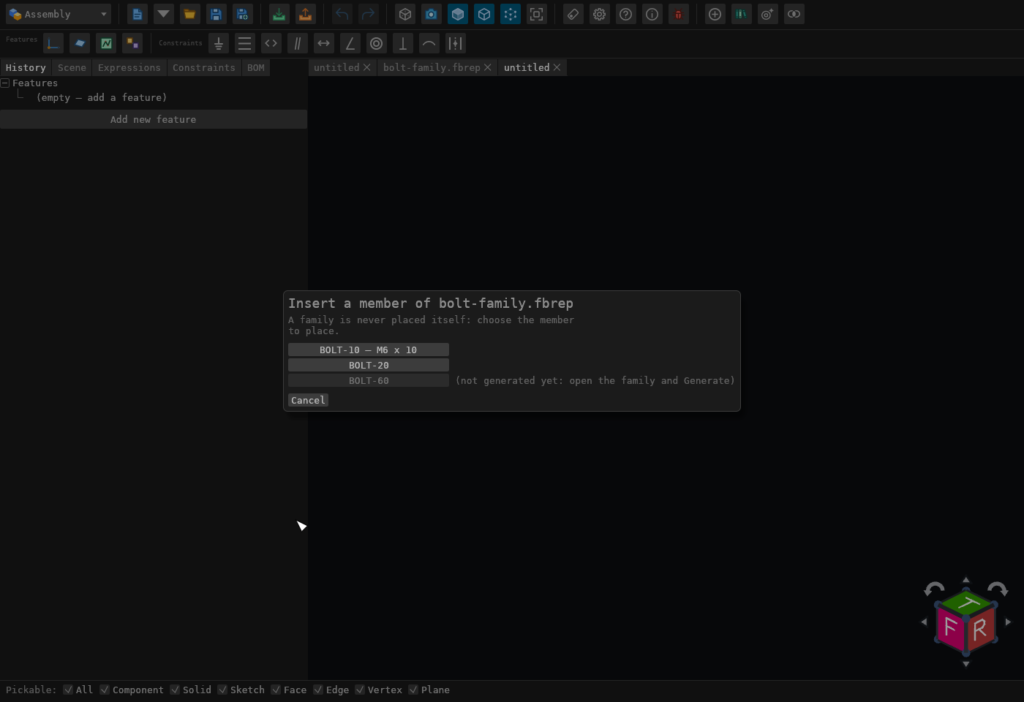
Add component in an assembly lists families beside parts. Choosing a family opens the member
picker: one button per row. A row that has never been generated is greyed out and says so.
Pick a member and its .nbrep is placed as an ordinary component.
Editing a member by hand
A member belongs to its family, so the app does not let you change it silently. The moment you change an open member, a prompt asks where the change should go:
- Save as a new part… — Save As opens. The part you save is an ordinary part with no link to the family, and the member file stays exactly as generated. It does remember what it was saved from: Replace component treats it as a relative of the member and its family, so mates on faces you did not change survive the swap.
- Open the family — your change to the member is undone and the family comes forward, so you can make the change there and Generate.
- Cancel (undo the change) — the change is undone.
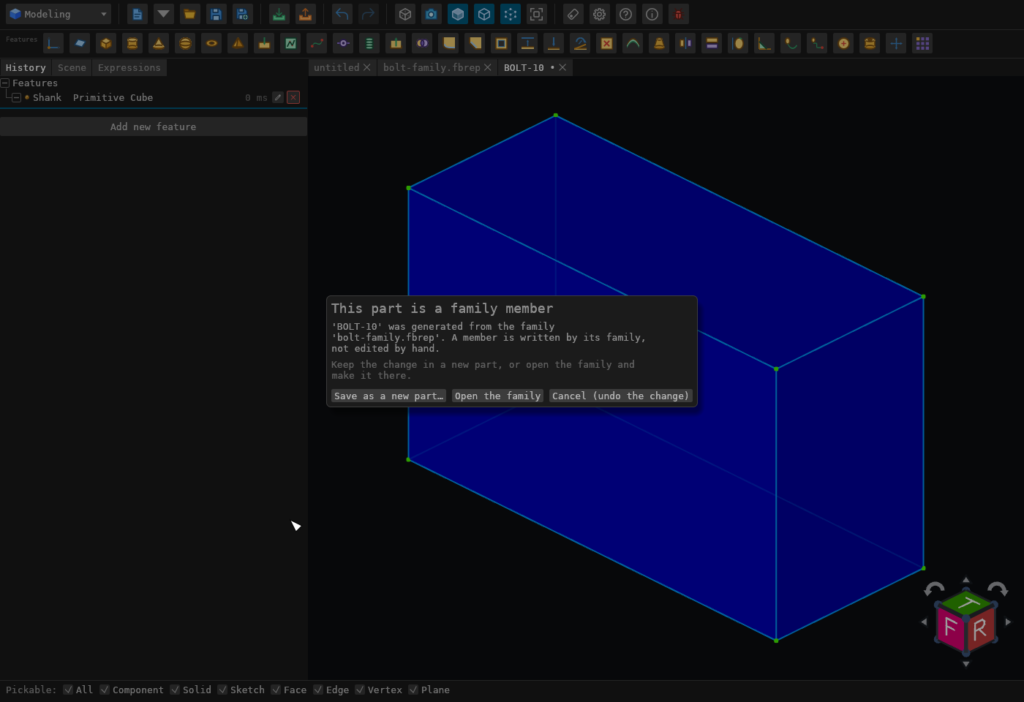
Save on a member shows the same prompt rather than writing the file. An assembly's BOM edits
to a part's attributes, which normally write back to the part's file, leave a member's file
alone and say so in a notice. The assembly keeps the edit.
Templates (.tbrep)
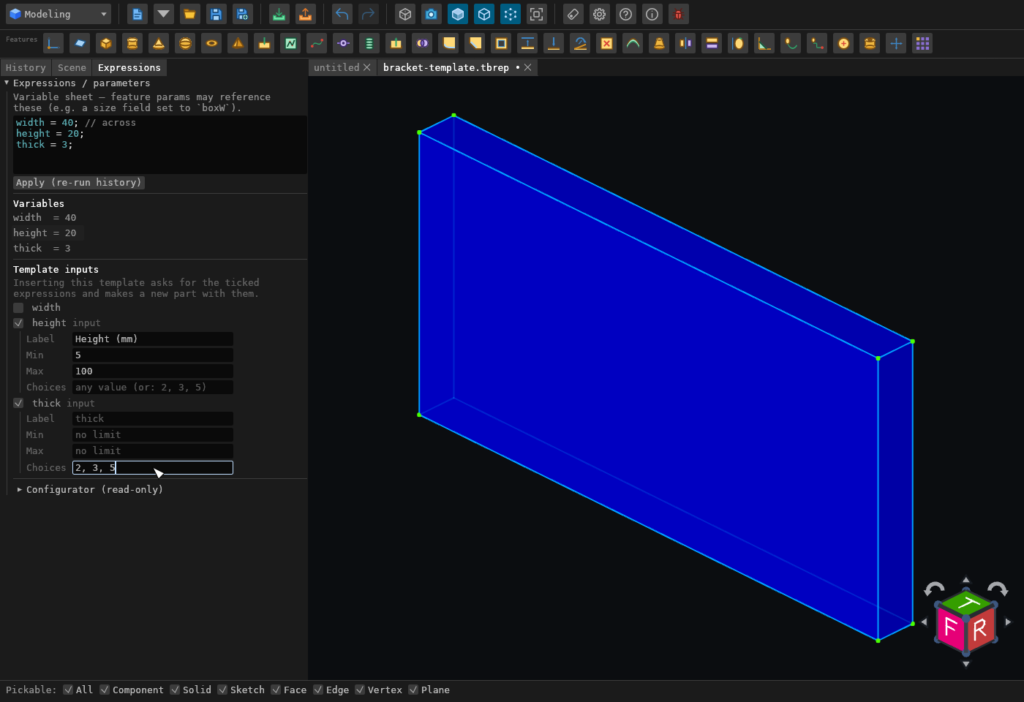
A template is a model whose sizes come from expressions, for example a bracket with height
and thick. While a template is open, the Expressions pane shows a
Template inputs list with one row per expression. Tick the ones a user sets when they
use the template. Each ticked input can have:
- a label the insert prompt shows instead of the expression name;
- a minimum and a maximum (inclusive);
- a fixed list of choices, comma-separated (
2, 3, 5). The prompt then offers exactly those.
Using a template
Choosing a template in Add component opens a prompt for the new part's name and each
input, filled in with the template's own values. A value outside the limits is named in
orange, and Create and insert stays disabled until every value is acceptable. A value may
be an expression that uses the template's other expressions, for example width / 2.
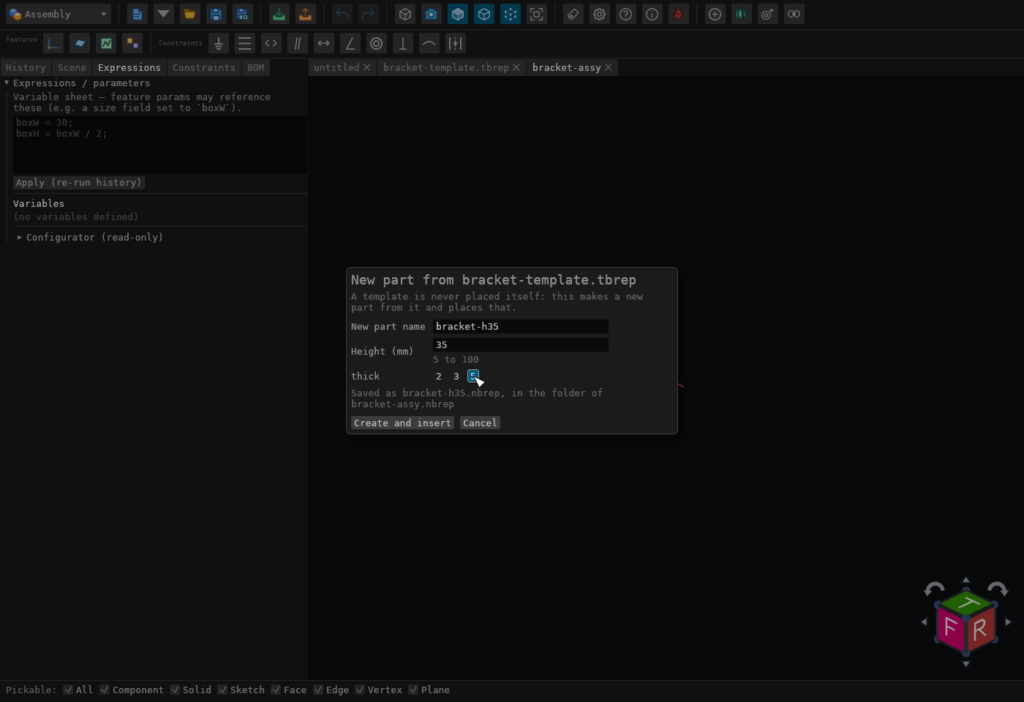
Create and insert writes the new part as <name>.nbrep in the assembly's folder and
places it. If the assembly has not been saved yet, the part goes to the models folder and the
status line says so. A name that already exists is refused, never overwritten.
The new part is an ordinary part. It keeps its expressions, with your values in place of the template's, so you can keep adjusting it. It records which template it came from (the template's file name and a fingerprint of its contents) for reference only. Changing the template later never changes parts already made from it.