Concentric
Id prefix: CONC · Elements: exactly two · Selection filter: FACE / EDGE · Entry 6 of 16 in the panel's + dropdown
Concentric puts two axes on one line: a shaft in its bore, a bolt through a stack of plates, a dowel in a hole. The radii and lengths need not match; only the centreline is held, leaving the slide along the shared axis and the spin about it free.
That indifference is why Auto constraints asks the concentric question about every pair of parts rather than only about neighbours.
Parameters
| Parameter | ||
|---|---|---|
elements | two axis-bearing elements (cylindrical / conical face, circular edge) | The pair to share an axis. |
facing | aligned / opposed dropdown, unset on a new constraint | The two axes point the same way, or opposite ways. A new constraint takes the facing it is placed with and shows it here after its first solve; Flip picks the other one. |
Walkthrough
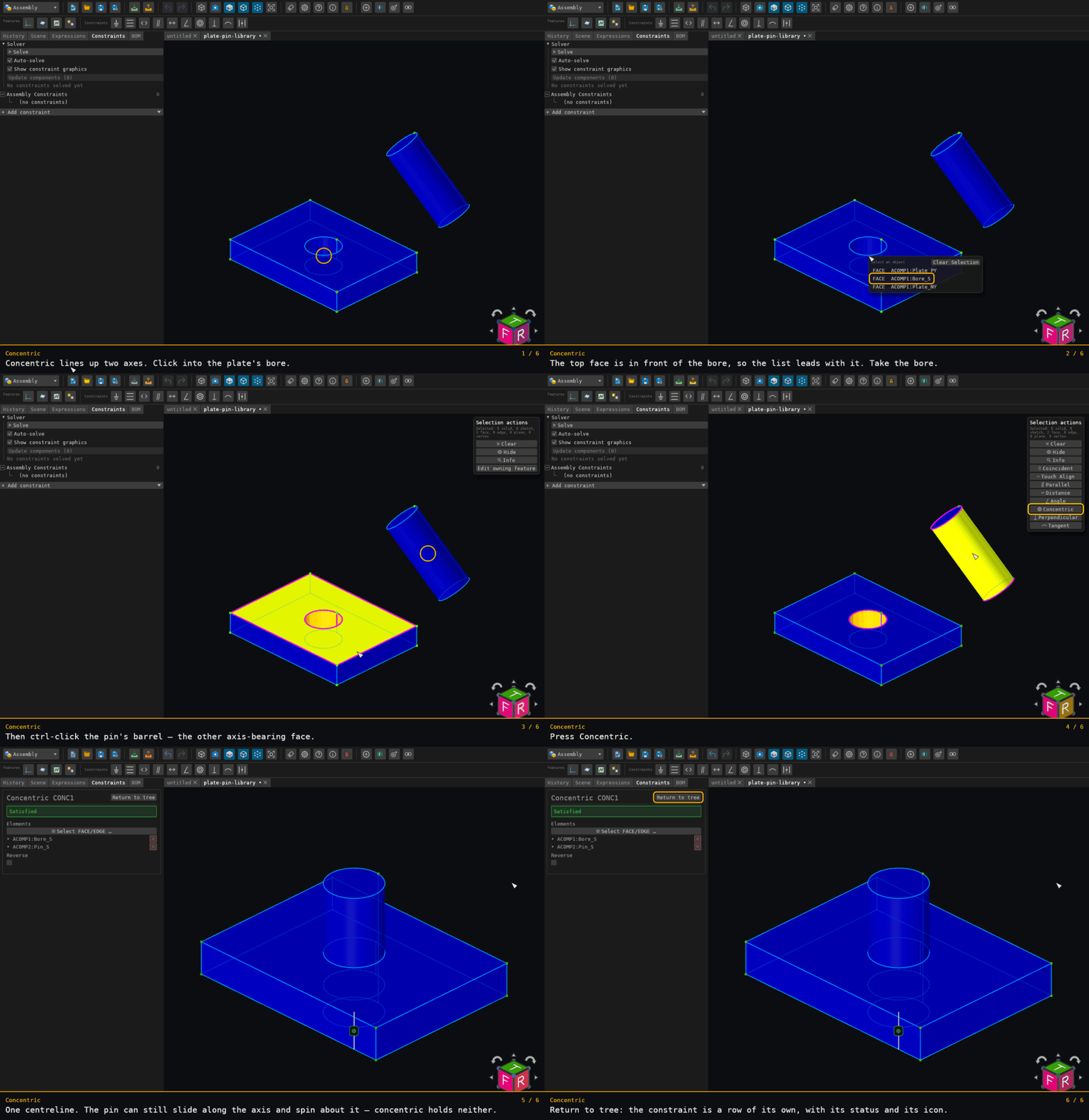
The only walkthrough here that picks the plate's bore rather than its top face. The bore lies behind the top face from the camera, so it is taken one row down the pick list — the ordinary way a pick list is used.
Afterwards the pin's axis is on the bore's: x = 20 and z = 15. The y is left alone, because sliding along the shared axis is the freedom concentric leaves.
Offered for two elements on two distinct components — see where constraints are offered.