Assembly Component
Status: Implemented
An Assembly Component is one placed instance of an entry in the document's parts library. The part itself is stored once; each component is a reference to it plus a rigid pose, so placing the same part twenty times costs one copy of the geometry and twenty small history entries.
Inputs
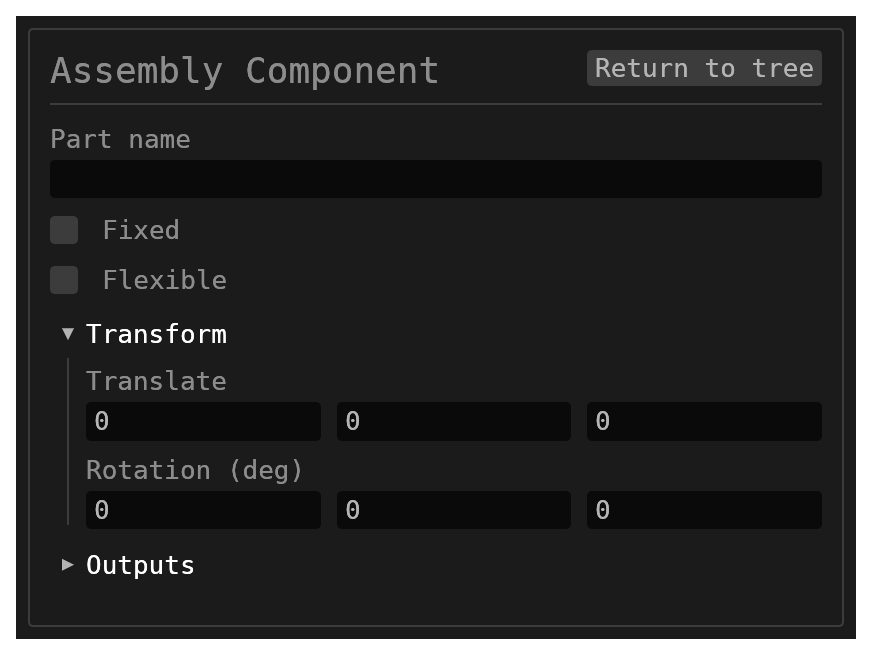
partName– astringnaming the parts-library entry this instance places. Defaultnull; filled in by the insert flow and required to build.transform– atransformrigid instance pose:translate[x, y, z]plusrotateEulerDeg[rx, ry, rz]in intrinsic-XYZ degrees. Both are expression-capable per component. Default{ translate: [0, 0, 0], rotateEulerDeg: [0, 0, 0] }.isFixed– aboolean; grounded means the constraint solver never moves this component. Defaultfalse, with the auto-ground rule below.flexible– aboolean, defaultfalse. On a sub-assembly instance, its own constraints solve together with this assembly's, so an assembly constraint can move one of its parts along whatever the sub-assembly's constraints leave free. Each instance solves on its own; where its parts end up is kept on this feature (flexiblePoses), and the sub-assembly's own document is never changed. Off, the sub-assembly is one rigid body. See Sub-assemblies.id– astring, defaultnull. It must have the formACOMP<digits>; any other id fails loudly.
How to add one
- The Assembly Component toolbar button in the Assembly
workbench, or the
Assembly Componententry in the Add-feature palette. Both open the same insert-component modal: existing library entries first, with an Upload button for a new file. - A family (
.fbrep) or a template (.tbrep) chosen in that modal is never placed itself. A family asks which member to place; a template asks for a new part's name and its inputs, writes that part, and places it. See Families and Templates. - The step.parts library button, which imports an online STEP part and adds it as a component.
- Importing a STEP file as an assembly, which stores each distinct part once and appends one component per occurrence in a single batch — one rebuild, one undo step. See Import 3D Model.
The component is never offered by the selection context bar: components are inserted from the parts library, not created from a selection.
Behaviour
- Normally the part's stored geometry is loaded directly; the part's own feature history is not re-run, which is what makes a large assembly rebuild quickly.
- Self-heal: if the entry is marked dirty (edit-in-context, or a refresh) or its stored geometry will not load, the part's document is re-run in isolation and the stored geometry rewritten. A part whose geometry is unreadable and whose document fails to re-run is an error naming the part.
- Stale: geometry stored by a different kernel build is rebuilt from the part's document the same way. When the rebuild changes the part, a note says how; if the rebuild fails, the stored geometry is used, with a note saying so.
- The pose is composed through the same translate-rotate-scale convention Transform uses, so a solver or gizmo write-back and a typed value agree.
- Every solid, face and edge the part contributes is namespaced under the component id
(
{id}:{name}), which is what keeps two instances of one part distinguishable. - The part's metadata is attached under those namespaced names and replaced wholesale on
each run, so a refreshed part's removed keys do not linger. An
inheritsFromvalue is namespaced too, keeping a sub-part's inheritance chain inside the sub-part.
Grounding
When isFixed is absent and no component appears earlier in the history, the instance
is grounded automatically — the first component of an empty assembly is fixed. The rule
keys on absence, so an explicit false is always honoured and you can un-ground the sole
component.
Limitations
partNamemust name a live parts-library entry. A missing entry is an error (part '…' is not in the parts library).- The pose is rigid: translate and rotate only. There is no scale field on a component.
partNameis a plain string field in the dialog — there is no component picker.
Related
- Assembly workbench — the panels, constraints and tools that surround components.
- Transform — the same pose convention for plain solids.
Where to find it
In the Add-feature palette of the Assembly,
All and Wire harness workbenches
only — Modeling and Sheet Metal
filter it out. The PCB workbench toolbar also carries the Add component button. Type
code ACOMP.