Refit Faces
Status: Implemented
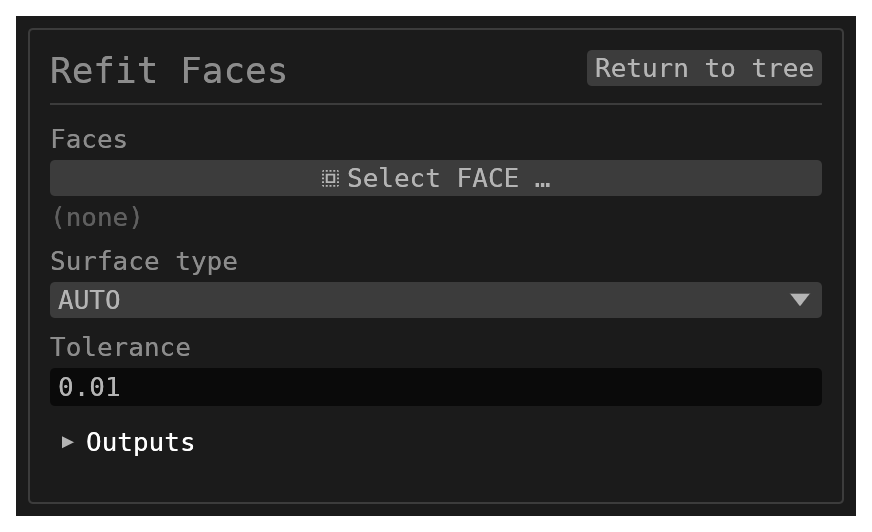
Refit Faces is for cleaning up a model after a mesh import. When a mesh import turns a triangle mesh into a solid, automatic surface recognition finds most of the planes, cylinders and spheres. Sometimes it misses one, and a round wall comes in as a band of flat strips or a dome as a patchwork of facets. Refit Faces lets you fix that by hand. Select the faces that are really one surface, say what kind of surface it is, and the feature replaces them with a single face of that kind.
What it does
- It fits one surface of the chosen type to the selected faces. It uses the same fit the import uses: random-sample candidates, then a least-squares refinement. The fit uses the faces' vertices. A facet's corners lie on the surface it approximates, but its flat interior does not.
- It removes the selected faces and puts one face on the fitted surface in their place.
- It trims the new face by the outline of the region you selected. Each stretch of that outline shared with one neighbouring face becomes one exact edge: the curve where the fitted surface meets that neighbour. A faceted cylinder's many-sided end caps come back bounded by true circles. Its volume becomes the cylinder's exact volume, not the slightly smaller volume of the polygon prism.
The neighbouring faces keep their names and their surfaces. Only the edges they shared with the selection are replaced. There is one exception: a flat face whose only edge is the new circle, such as the end cap of a cylinder or a pipe bend, is moved onto the circle's own plane. The move is no larger than the fit residual. Without it, a mesh stored with single-precision coordinates would leave the cap slightly off the circle it is bounded by.
The new face takes the name of the first face you selected. The names of the other selected faces go away, because those faces no longer exist.
After a successful run, the fitted surface and how well it fits are shown under the feature in the history. For example: fitted cylinder radius 5.000000 axis (0, 0, 1) through (0, 0, 5) to 24 faces: residual max 8.9e-16, rms 1.6e-16 (tolerance 0.01).
Parameters
| Parameter | Meaning |
|---|---|
| Faces | The faces that together form one surface. They must be on one body and connected edge to edge. |
| Surface Type | AUTO, PLANE, CYLINDER, CONE, SPHERE or TORUS. AUTO picks the best fit among the five. |
| Tolerance | The largest distance, in model units, that any vertex of the selected faces may lie from the fitted surface. The default is 0.01. |
When it refuses
Refit Faces never changes the body partway. If it cannot do the whole job, the body is left as it was and the feature shows the reason:
- not edge-connected: some of the selected faces share no edge with the rest. Refit each connected group as its own feature.
- fit residual … is over the tolerance: the faces are not one surface of that type,
within the tolerance. The message gives the largest and the RMS distance, so you can
tell a slightly-too-strict tolerance from the wrong surface type. For example, a
quarter of a cylinder forced to
PLANEat tolerance 0.01 misses by about 0.95. - too coarse: a selected flat face would span more than 60° of the fitted surface, which makes it wider than the radius it approximates. The fit reads the faces' corners, and a handful of corners can lie on a surface the faces themselves do not follow. For example, the 16 corners of an 8-sided can all lie on one sphere, but its flat ends would each cover about 90° of it.
- not a disk or an annulus: one face can take a region with one outline (a patch) or with two (a band, such as the whole wall of a cylinder between its two caps). A selection that pinches at a vertex or has more holes cannot be one face.
- only a sphere or a torus closes on itself: every face of a closed shell was selected
with
PLANE,CYLINDERorCONE. None of those surfaces can close a shell without caps. - does not match the shell's topology: a whole ball-shaped shell was forced to
TORUS, or a whole ring-shaped shell toSPHERE. - no exact boundary: an outline stretch runs along a neighbour whose surface the fitted one does not meet in a known closed-form curve, or the shared edges are too far from that curve. Include that neighbour in the selection, or refit it first.
- result does not validate: the rebuilt body failed the kernel's topology check. This should not happen; please report the model.
Scope
Refit Faces handles planes, cylinders, cones (not the pointed tip; the apex must lie outside the region), spheres (a region that stays at least 5° away from the two poles the feature can choose) and tori. Each selected flat face may span at most 60° of the fitted surface. A hexagonal prism (exactly 60° per face) still refits as a cylinder; a pentagonal one is refused. Every edge of the new face is an exact analytic intersection with a neighbour. A boundary that would need an approximated curve is refused, not guessed.
Whole closed shells
Selecting every face of a closed shell refits the whole shell. This covers a complete
faceted ball or a faceted ring. The shell becomes one exact sphere or torus, with no outline
to trim. AUTO picks by the shell's own shape: a shell with no hole through it becomes a
sphere, and a ring becomes a torus. If the body is nothing but that shell, the body becomes
that sphere or torus. If the shell is a cavity inside a larger body, such as a faceted ball
hollowed out of a block, the cavity becomes an exact spherical or toroidal hole and the rest
of the body is untouched. The face keeps the name of the first face you selected.
A clean faceted ball usually arrives from the mesh import as an exact sphere already. The
shells that need Refit Faces are the ones the import left as facets, such as a scan whose
points sit a little off the true surface. Set the tolerance above that scatter.