Sweep
Status: Implemented — polyline paths (translate), curved paths (pathAlign), closed
paths (pathAlign, as a capless ring — flat or not), mitred corners (pathAlign on a
cornered polyline) and the whole picture frame (pathAlign on a closed cornered
polyline, flat or not). Not built: a corner at a curved segment.
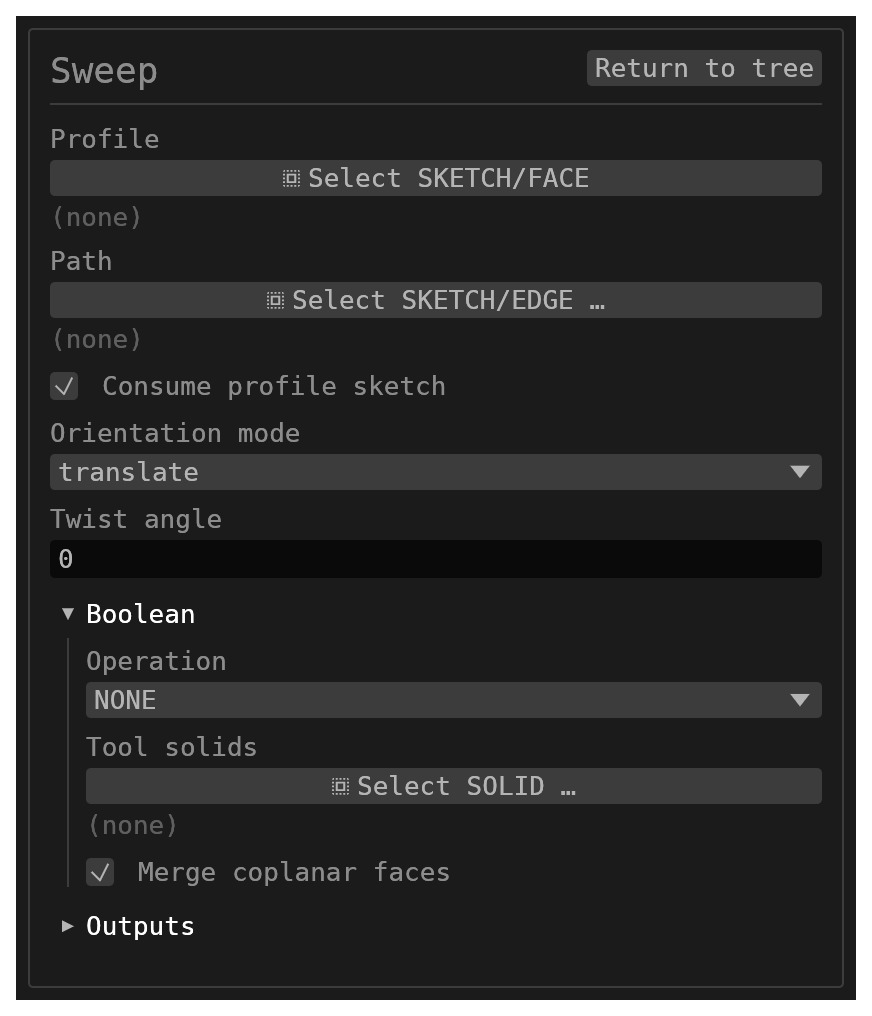
Sweep carries a closed profile along a path in one of two modes, chosen by
orientationMode:
| The path is | Set orientationMode to | What you get |
|---|---|---|
| a cornered polyline (straight segments) | translate (default) | the profile keeps its orientation and slides along each segment's chord — one oblique prism per segment, so the corner is handled |
| smooth — curved, or segments meeting tangentially | pathAlign | the profile is carried by the path's own motion — it keeps the position and the angle you drew it at, and turns exactly as much as the path turns — swept as one continuous tube |
| smooth and closed (a circle, a rounded rectangle, a loop that leaves its plane) | pathAlign | the same carry, all the way round and back to the section it started from — one capless ring, no end faces at all |
| cornered and you want the profile to follow it | pathAlign | a mitre at every joint: the section is swept along each segment and both sweeps are cut off on the plane that bisects the joint, where they share one face loop — like a picture frame |
| cornered and closed (a picture frame's whole loop, flat or not) | pathAlign | a frame: a mitre at every joint, the closing one included, and no caps at all |
| cornered at a curved segment | neither — refused | a mitre needs two straight directions to bisect; a curve has none, and nothing mitres some joints while skinning others |
| a closed path that crosses itself | neither — refused | the sweep would pass through itself where the two sides cross |
On a cornered polyline the two modes differ only in where the section sits: translate
slides it without rotating it, pathAlign turns it through each joint and mitres.
translate refuses a curved segment; pathAlign sweeps one. Within pathAlign, a joint
smooth to within about 1° is skinned as one continuous tube, and anything sharper is a
corner, mitred when both its segments are straight.
For a twisted sweep, use Path Sweep (SWP); this feature refuses a
non-zero twist. Path Sweep is a different construction — see Related.
Walkthrough
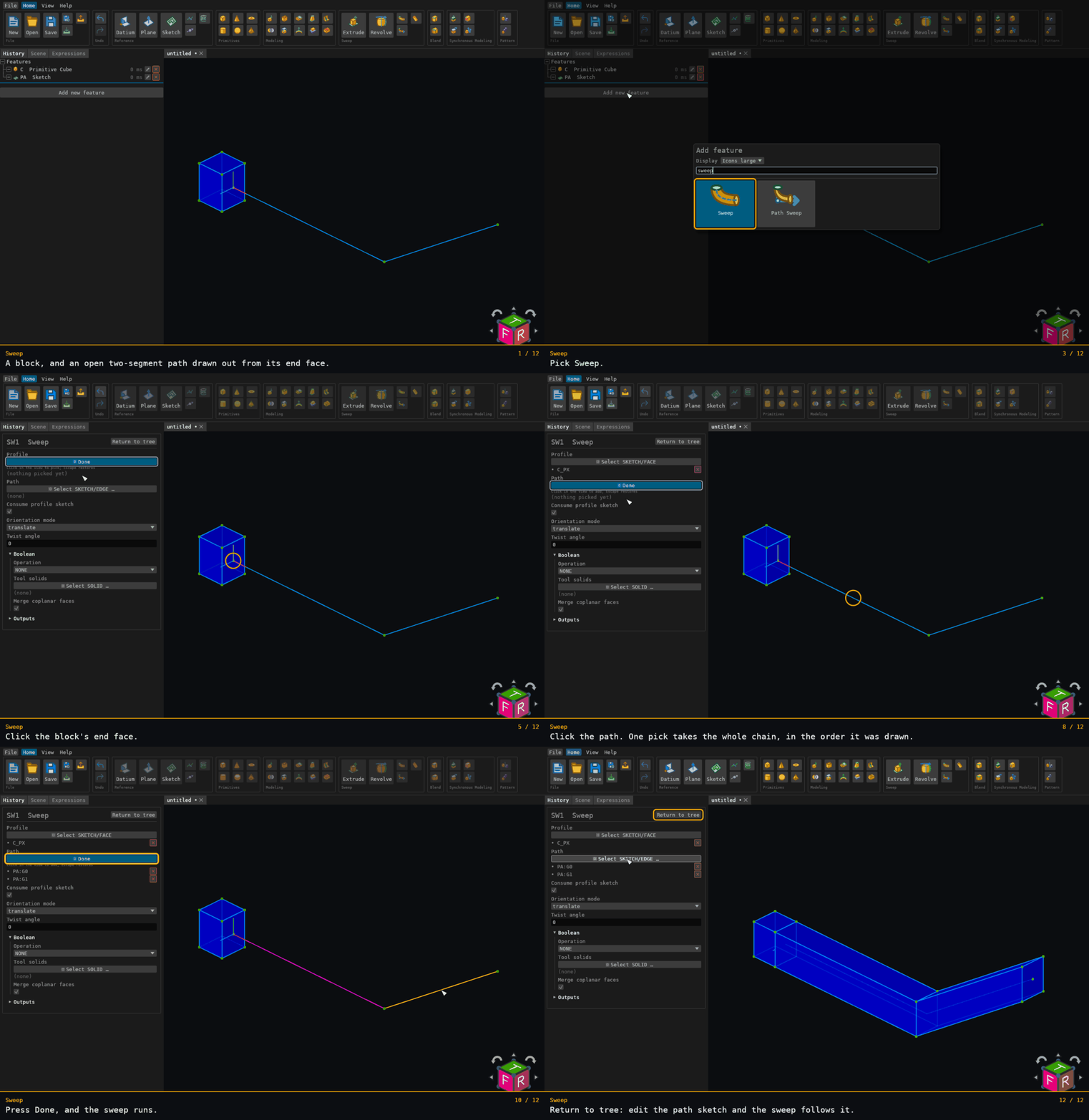
Recorded from the running app by BREP_mcp/tests/videos/sweep.json; regenerate every walkthrough with ./build.sh docs-videos.
Inputs
profile– aSKETCHor a residentFACEto sweep.consumeProfileSketch– whentrue(default), removes the source sketch after a successful sweep. A face profile is never consumed.path– the trajectory, as amultipleSKETCH/EDGEselection:- a whole sketch contributes its published chain (its longest open run, or a lone
closed loop — which
translaterefuses andpathAlignsweeps as a ring). Click the sketch's sheet in the 3D view to get the whole thing; click one of its drawn segments to get that edge. (Selecting before invoking Sweep from the context bar pre-fills the fields in order: the first selected sketch fillsprofile, and further sketches and selected edges fillpath.) - individual connected edges — sketch segments, resident solid edges, or a mix — are chained head-to-tail by endpoint coincidence, and an edge that runs the "wrong" way is reversed for you.
- The first pick decides which way the sweep runs; the order you clicked the rest in makes no difference.
- A selection that does not form one connected run is refused, and the error names the selection that joins nothing.
- a whole sketch contributes its published chain (its longest open run, or a lone
closed loop — which
orientationMode–translate(default) orpathAlign; see the table above, WhatpathAlignbuilds and Cornered paths underpathAlign.twistAngle– degrees. Must be zero (see Limitations).boolean– optional union / subtract / intersect applied after the sweep solid is built.id– optional identifier for the history entry.
Behaviour
- One portion per path segment (
translate). Portioniextrudes a copy of the profile — translated by the sum of the preceding segments' chords, so consecutive portions share a cap exactly even when individually picked edges only meet within tolerance — along segmenti's chord. Portion 0 is untranslated, so a single-segment path builds exactly the geometry it always did. - A profile with several regions unions into one solid. Region holes are subtracted per portion, before the portions are unioned, which is what carries a hole channel around a corner.
- The portions are unioned with the sidewall and hole-wall faces pinned out of the
coplanar merge, so each portion keeps its own faces and its own names. Two coplanar
portions therefore meet at a visible seam edge rather than fusing — the price of a wall
name that does not move when the path is edited. The pin covers this feature's own unions
only; the
booleanparameter's fold runs un-pinned like every other feature's, so it can still merge portion walls that end up coplanar there.
Closed paths: a ring or a frame, with no end caps
A path that comes back to where it started — a circle, a rounded rectangle, a rectangle with
sharp corners — has no ends, and under pathAlign it is built accordingly. A smooth
loop is a ring (skinned round the loop) and a cornered one is a frame (mitred at
every joint, below); both are the same capless shape:
- the first and last station are the same station, so the profile arrives back as the section it started as rather than as a second copy landing on top of the first;
- there are no end caps — a cap would be a face inside the material. A closed sweep's
faces are its side walls and nothing else, and no
_START/_ENDname is registered: a reference stored against a cap of an open sweep will not resolve once the path is closed; - the body is genus 1:
V − E + F = 0, the Euler characteristic of a torus; - the volume is Pappus: the section's area times the distance its own centroid travels.
For a circular path that is
A · 2π · r̄withr̄the profile centroid's distance from the turn axis — exactly the Revolve of the same profile. For a rounded rectangle it isA × perimeter. A mitred frame givesA × perimeterwhen the section is centred on the path, andA × perimeter − 2 · (∫ξ dA) · Σ tan(θ/2)when it is not,ξbeing measured across the bend toward the inside of the turn.
A flat loop comes back to itself after one lap and the section meets itself at the seam.
A loop that leaves its plane comes back rolled about the path by the path's
holonomy — the solid angle its tangent direction sweeps out on the unit sphere — and the
sweep closes it with the smallest counter-twist that does: minus that roll, spread evenly
along the path, so there is no seam. A loop with a mirror symmetry, or one that lies on a
sphere, comes back unrolled and gets no twist. A section centred on the path still gives
A × path length, to the ring's own station accuracy.
A closed path must also not cross itself: two of its sides meeting anywhere but at a corner would make the sweep pass through itself there, so it is refused naming the two sides and how close they come.
A closed path is stationed by its turning as well as its length: 16 stations per quarter
turn. Without that, a rounded rectangle's short corner arcs would get two stations each and
the ring would cut the corner (measured 6 % low in volume on a 30 × 18 path with 4 mm
corners: watertight, and wrong). With it the same path reads within 0.05 % of
A × perimeter.
Face naming
Every face this feature builds is named after both the profile edge and the path segment that swept it, so nothing is named by position:
| Face | Name | Container |
|---|---|---|
| side wall | {tag}{profileEdge}:{pathSegment}_SW | {tag}{profileEdge}_SW |
| start cap (portion 0) | {tag}{faceName}:L{loopId}_START | {tag}{faceName}_START |
| end cap (last portion) | {tag}{faceName}:L{loopId}_END | {tag}{faceName}_END |
| hole wall | {id}:HOLE:L{loopId}:{pathSegment} | {id}:HOLE:L{loopId} |
{tag} is empty for an empty id, otherwise {id}:. {profileEdge} is the carried
{sketchId}:G{gid} name, or EDGE_{i} when the profile edge has none; {pathSegment} is
the path edge's own name the same way.
The container is a group name standing for that profile edge's (or hole loop's) faces
along every path segment. A single-segment sweep's container holds exactly one face, so a
reference stored under the old un-keyed spelling still resolves to the face it always meant.
A face profile, which has no sketch loop identity, keeps the un-keyed _START / _END cap
spelling.
Interior caps — where two portions meet — annihilate in the union, so only the chain's own two ends survive.
What pathAlign builds
pathAlign applies to the profile the same rigid motion the path itself undergoes. At
each point along the path, the section is
section(t) = P(t) + R(t) · (x − P(0))
— the profile x as drawn, moved from the path's start point P(0) to P(t) and turned
by R(t), the rotation that carries the path's starting tangent frame to its frame at t.
The profile's position relative to the path, and its angle to the path, are the ones you
drew. Consequences:
- A straight path is an extrusion from where the profile sits. The profile translates
along the segment's vector for the segment's length. If the sketch plane is oblique to
the path, you get an oblique prism — the same solid
translatebuilds from the same inputs, exactly. - An arc turns the profile about the arc's own centre, so the end cap arrives at the
same angle to the tangent that the start cap had. When the profile is drawn in a plane
through the arc's axis, the result is exactly the Revolve of the profile
through the arc's own angle — volume
A · r̄ · θfor the profile's own centroid radiusr̄, not the path's radius. - A helix screws the profile up its own axis: the profile keeps its place relative to the coil's axis, so a rectangle drawn in a plane through the axis sweeps a square thread, and after a whole number of turns the end face is the start face lifted by the height. A tapered helix keeps the profile square to its axis the same way. This needs the path to be the edge of a Helix feature, which hands its axis over with the curve.
Every other curve — a spline, a solid's edge, including one that happens to be helical — turns the profile the least it can while following the path (a rotation-minimizing frame). On any chain of lines and arcs that is exactly the turning each arc does about its own centre, so the rules above hold piece by piece. It is not a helix's screw: without the axis, a profile carried up a helix slowly rolls about the path — by 170° over three turns of a radius-5, pitch-5 coil. The joints between pieces pass the profile on without a jump.
The start cap lies in the sketch plane, where you drew the profile. The path does not have to start on the profile, or touch it; an offset profile on a curved path sweeps the ring that offset traces.
A section wider than its own bend
A round section carried through a bend TIGHTER than the section is wide does not fold: it sweeps a real solid, and Sweep builds it. Think of a wire bent round a mandrel narrower than the wire — the material on the inside of the bend reaches past the centre of the turn and out the other side, and everything it passes through is swept.
This is built for one shape: a circular section carried along a circular path, drawn on
the path and square to it under pathAlign (or any circular section under Path Sweep's
Transplant placement, which moves the section onto the path anyway). The result is the
region the moving disc actually covers, a shape of revolution:
- all the way round, it is one solid — an apple, with a dimple at each end where the
section crosses the turn's centre line. A full turn of a section of radius
rabout a path of radiusR < rencloses2π²Rr²plus the volume of the lens the section pushes past the centre line. - less than half a turn, it is TWO solids: the near lobe, over the azimuths the path itself covers, and a far lobe half a turn away. They touch only along the centre line. A Sweep feature builds one body per profile region, so this one is refused with the count and the reason.
Refused:
- a section that is not a circle, or a path that is not one circular arc — there is no
closed form for the shape a square section sweeps round a tight bend, so the answer cannot
be checked and is not shipped. Under Path Sweep the refusal names which of the two it was;
under
pathAlignit is the straddle refusal,the profile sweeps back through itself(see Limitations). - a section not drawn ON the path under
pathAlign— the sweep is then not a shape of revolution at all. It too is refused asthe profile sweeps back through itself. - a turn between half a revolution and a full one, where the far lobe runs back into the near one.
- exactly as wide as the bend, all the way round — the tube touches the centre line at a single point and the solid is pinched there, which is not a shape this kernel can hold. Less than a full turn, the same section builds.
Under the bar — a section narrower than its bend — the section is skinned between stations as usual.
Cornered paths under pathAlign: a mitre
A joint where two straight segments meet at an angle is built as a mitre, the way a picture frame's corner is cut:
- the section is swept along each segment, and both sweeps are cut off on the plane that bisects the joint;
- on that plane the two sweeps share one face loop — there is no face between them and no bulkhead inside the material;
- on the inner side of the bend the section is folded away, and on the outer side it
is extended past the joint. A section centred on the path gives exactly as much to the
outside as it takes from the inside, so the solid is
section area × total path length— measured to fifteen significant figures on a 6 × 4 section round a 20 + 20 right-angled L; - the walls perpendicular to the bend come out coplanar across the joint (a frame's faces are flush across its mitres); the walls facing in and out of the bend turn by exactly the joint angle, about the shared edge;
- the section can be any shape: a rectangle, a rounded rectangle, a circle. Every straight edge of the section mitres to a straight edge and every arc to an exact ellipse arc.
Two joints are refused, both quoting what they measured:
- a bend too tight for the section. The inner fold reaches back along the segment by
(half the section's width across the bend) × tan(half the joint angle), and if that reaches past the far end of the segment the inner side of the solid would pass through itself. The error names the segment, its length, the fold, and how much wall is left. Lengthen the segment, open the bend, or narrow the section. - a collapsed bend — a joint at or past 168.522°, where the bisector plane is within 6° of containing the path itself and the section's footprint on it is stretched more than 10 : 1. At 180° the path doubles back on itself and there is no bisector plane at all. Open the bend, or sweep the two legs separately.
A closed cornered path: the whole frame
A closed cornered polyline — a picture frame's whole loop — is built as the frame, with a mitre at every joint including the closing one and no caps at all. On a FLAT loop the section carried once round comes back exactly as it started, so the closing mitre is cut like any other and the result has no seam and no start or end face.
A loop that is not flat comes back rolled about the path, and the frame is closed by a
counter-twist: the roll is shared out over the sides in proportion to their length, and
each side turns its share about its own centre line over the middle half of its length,
where no mitre cuts the section — the mitres stay exact, and there is still one wall per
(side × profile edge). A section centred on the path still gives A × perimeter; an offset
one follows the corner law with each corner reading the section as it arrives, already
turned.
For n sides and a section of m edges: n · m walls and nothing else, n · m vertices
and 2 · n · m edges, so V − E + F = 0 — the same genus 1 a smooth ring has.
Refused, each quoting what it measured:
- the mitres overlap. Every side of a frame is cut at both ends, so a section wider across the bend than a side is long leaves that side no wall at all. The error names the side, its length and both of its joints. Make the frame bigger, or the section narrower across it.
- a side too short for its twist (loops that are not flat only). A section whose mitres reach into the middle half of a side is refused, naming the side, its share and the run; so is a section reaching so far from the path that the turn would tilt a wall past the 0.1 floor a mitre refuses a grazing cut at. Lengthen the side, or narrow the section.
- the loop crosses itself. The error names both sides and how close they come.
A frame's section may sit anywhere across the path — centred on it, or offset so the frame
hangs inside or outside the loop you drew. Centred, the volume is exactly
section area × path perimeter; offset, it is A × perimeter − 2 · (∫ξ dA) · Σ tan(θ/2). A
6 × 4 section round a 40 × 28 rectangle, drawn 1 toward the inside, measures 3072 against
that closed form to fifteen significant figures — where four un-mitred prisms unioned would
read 3008 and their plain sum 3264.
A path that MIXES the two — some joints sharp, some segments curved (a rectangle with one corner rounded) — is refused: the mitre needs every segment straight, the smooth lane needs every joint tangent-continuous, and nothing builds one construction for some joints and the other for the rest. Round every corner, or leave every corner sharp.
Face naming under pathAlign
On a smooth path pathAlign builds one tube, so there is exactly one side wall per
profile edge, named with the container spelling from the table above,
{tag}{profileEdge}_SW. Caps keep the loop-keyed {tag}{faceName}:L{loopId}_START /
_END, and there are no interior caps.
A mitred path has a wall per (profile edge × path segment), so it takes exactly the
per-segment spelling translate uses — {tag}{profileEdge}:{pathSegment}_SW, under the same
container. A reference into a mitred pathAlign sweep and one into a translate sweep of
the same path are the same string. A mitre joint has no cap, and a closed cornered path
registers no _START / _END name, exactly as a ring does not.
Because both modes key on the carried {sketchId}:G{gid} profile-edge name, re-picking the
path or inserting a segment never moves a name, and a reference stored against the
container resolves under both modes — switching orientationMode does not break it. A
reference to a specific per-segment wall (…:{pathSegment}_SW) will not resolve after a
switch to smooth pathAlign, because that face no longer exists.
Limitations
translatetakes straight segments only. A curved segment is refused, and the error names it and the fix:sweep: path segment 'Sk:G21' is curved, and orientationMode: translate slides the profile along each segment's CHORD … Set orientationMode: pathAlign to sweep this path. Switching the mode keeps the path selection you already made.translaterefuses a closed path, by its closure. Going round a loop without rotating the profile cannot work, so the refusal says the path is a ring and points atpathAlign, which builds it — a smooth loop as a ring, a cornered one as a frame.- Under
translate, the path must not double back through the profile. Every segment must advance through the profile the same way, or the profile would be driven back through material it has already swept. - Under
pathAlign, a corner at a CURVED segment is refused, naming both segments, the angle, and which of them is curved. A curve has no single direction to bisect, and skinning the joint instead would round the corner off — a wrong solid that would still be watertight. Split the path at that corner and sweep each run separately, or round the corner so the joint is tangent-continuous. (A break under about 1° counts as smooth, so curves a sketch joined on endpoint coincidence still chain as one tube.) - A mitre needs room: a bend too tight for the section, a collapsed bend, and on a frame
overlapping mitres or a side with no room for its counter-twist — see
Cornered paths under
pathAlignand A closed cornered path. - No twist here, on any path —
twistAnglemust be zero (below); a non-flat loop gets only its own counter-twist (see Closed paths). Path Sweep takes a twist that closes on a closed path (a whole number of turns, or a step of the section's symmetry about the path), including a CLOSED cornered frame; an open cornered run refuses it there too. - On a SMOOTH turning path under
pathAlign, the profile must not straddle the turn's axis — unless it is a CIRCLE on a CIRCULAR path, which is built (see A section wider than its own bend). A profile lying on both sides of the axis has one half advancing while the other retreats, and the sweep folds into itself. It is refused —the profile sweeps back through itself— rather than built as a self-intersecting solid (an exact test, not a sampled estimate). Move the profile clear of the axis, or sweep the run in pieces. A mitre carries no such rule: its inner fold is cut off on the bisector plane, so a section centred on the path is the ordinary case. - A segment must not run (nearly) inside the profile plane: a direction within about 6°
of the plane is refused (
sweep direction is nearly parallel to profile planeundertranslate,the path is nearly parallel to the profile planeunderpathAlign), because the profile would sweep a sliver rather than a solid. A path lying exactly in the profile plane is refused underpathAlignasthe path does not advance through the profile. Both modes draw the line at the same angle. - Only a Helix feature's edge is swept as a helix under
pathAlign. A helical edge from anywhere else carries no axis and rolls about the path as it climbs (see WhatpathAlignbuilds). Pick the Helix feature's own edge to sweep a thread or a spring. - A non-zero
twistAngleis refused:sweep: non-zero twistAngle is not yet migrated to the Rust pipeline. - A missing path selection is a hard error.
Related
- Path Sweep (
SWP) — the curve-following, twistable sibling. It takes the same path selection, but it is a different construction: it moves the profile onto the path and squares it to the path, wherepathAlignleaves the profile where it was drawn and carries it. It also honourstwistAngleand names side faces_SWPinstead of_SW. - Extrude, Revolve, Loft.