Delete Face
Status: Implemented
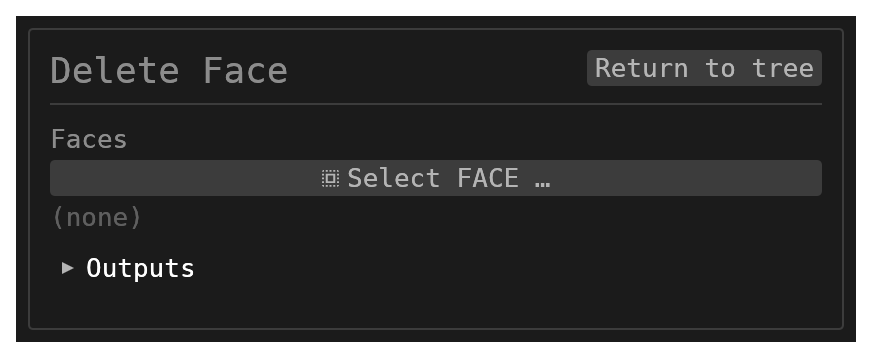
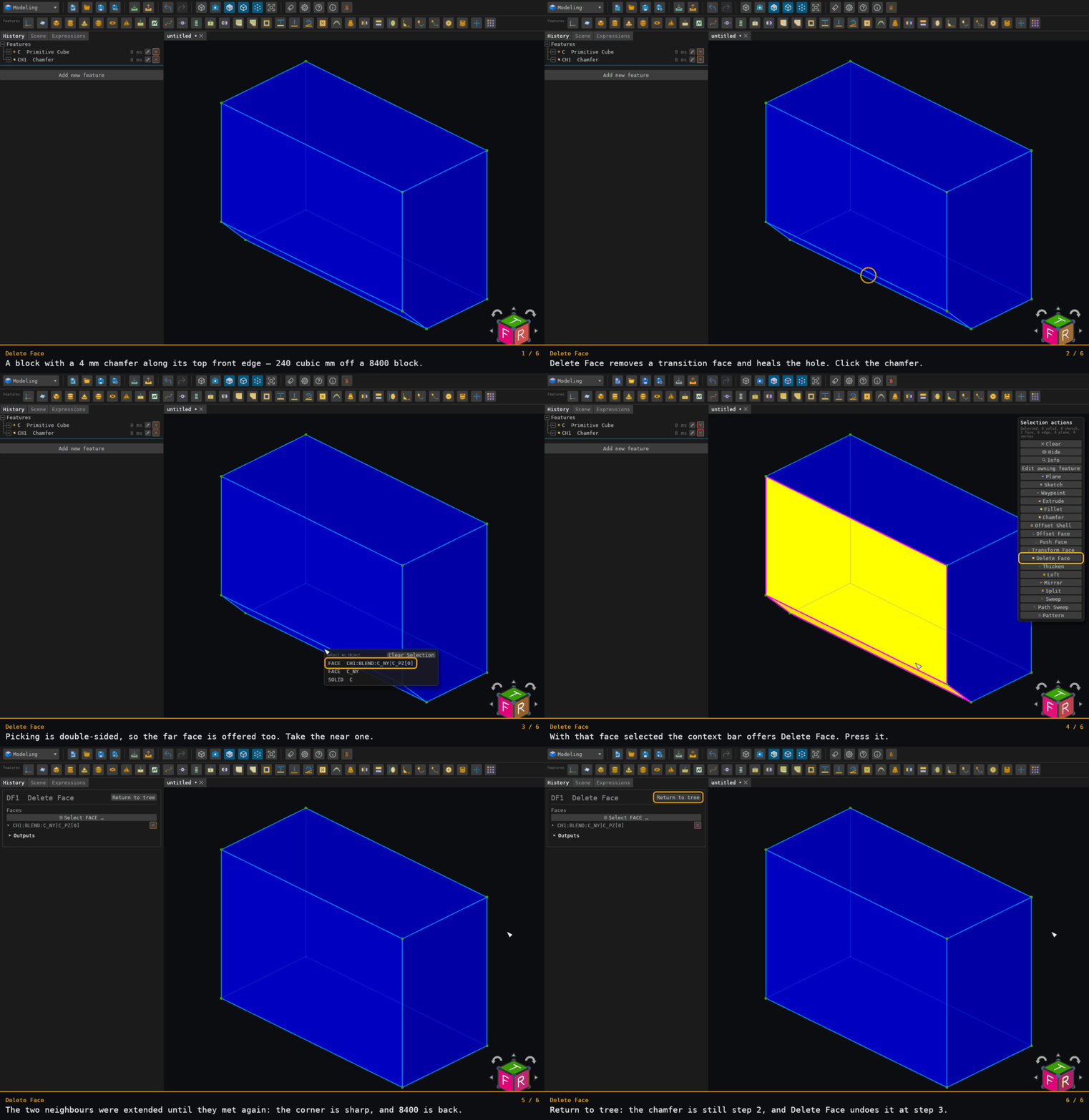
Delete Face removes one or more transition faces — a chamfer, a constant-radius fillet, or any simple four-sided transition face — and heals the hole by extending and re-intersecting the immediate neighbouring faces. It is the way to undo a blend that is baked into imported geometry, where no fillet feature exists to edit.
It also removes a whole feature. Select every face of one — a hole drilled clean through a body (its bore cylinder), a blind pocket (its walls and its floor), or a boss (its wall and its top) — and the feature is un-cut: those faces go, the opening they made in the face they were sunk through closes back over, and the body returns to what it was before. That heal is a cap, not a re-intersection, because a pocket's floor and the face around its mouth were never meant to meet.
The two heals are told apart by the selection's own shape, not by a mode: a selection whose free boundary is a whole hole loop of some other face is a patch and gets capped; anything else is a transition strip and gets re-intersected.
The wall a hole was drilled through does not have to be flat. A hole through a curved or free-form wall — a lofted or swept side, a pipe bend's tube, a face that arrived as a B-spline from an imported STEP file — is un-cut exactly the way one through a flat plate is: the faces go, the openings close back over, and the body returns to the volume it had before the hole was made, with the wall's own surface untouched. Nothing is refitted and nothing is approximated, so the restored body is the original body and not a rebuilt likeness of it.
A feature's opening does not always leave a hole loop to drop. When a hole's mouth is tangent to the boundary of the face it opens through — a bore that just touches the setback of a fillet on the same face, say — the mouth pinches that face and the body carries it as two faces meeting at the tangency points. Deleting the wall closes the mouth by rejoining those two faces into the one they were before it pinched them; the first of them (in the body's own face order) keeps its name, and nothing else about either face changes.
A deleted selection can also be a band that runs right across a body. Mirror a part and union the image back on so the two copies overlap, and each copy's corner round meets its twin in a groove — over the top of the part and down its side. Select the groove and the faces either side of it are not two different faces to re-intersect: they are the same plane, or the same round, arrived at from the two copies. So the groove is not re-intersected but bridged. Wherever the band crossed an edge those two faces still share — a fillet's setback line, a round's tangent line — that edge is put back across the band, and with it the two halves close into the one face they are. Nothing is approximated: every bridge is an edge the body already had, continued.
A whole corner round is one question too. Round the three edges that meet at a box corner and the fillet leaves four faces: three cylindrical strips and the sphere the rolling ball leaves between them. Select all four and the corner comes back sharp. It cannot be done a face at a time — a single strip's two walls re-intersect in the box's own sharp edge, which passes the corner sphere without ever meeting it, so what would bound the sphere once one of its three neighbours went is not something the model says. Taken together the answer is exact: each strip's two walls re-intersect into its recovered sharp edge, the face the strip ran out into clips one end, and the other end is where that edge meets the corner's third wall. All three edges must name the same point, and that is what is checked before anything is changed.
A whole fillet network is the same question at any size. Fillet the edges round the foot of a rib or gusset, or the four edges of a box's top face, and the fillet leaves strips that end on other strips — at a corner sphere, or mitred into the next strip where two rounds meet over a sharp edge. Select every face that fillet left and the sharp edges come back. Each strip is read off the two faces it is tangent to — its walls — and becomes the sharp edge where those walls meet. Every place strips end together (a corner sphere, a mitre, a strip's end on the face it runs into) shrinks to one vertex: the point where every face that meets there intersects, which all of them have to contain before anything is changed. That includes a box with every edge rounded: select all twenty faces the fillet left — twelve strips and eight corner spheres — and the sharp box comes back, its six sides keeping their names, even though each side is bounded by rounds and nothing else.
A selection can be both. Pick four counterbored holes and the block's corner rounds in one go and the selection is neither kind as a whole — the fillets leave part of the top face's outer boundary standing, so the set is not one patch. So it is split where it is already split — into groups of selected faces that touch each other along an edge — and each group is healed the way its own shape asks for: the holes cap, the fillets re-intersect. The caps go first, because a cap moves nothing and a re-intersection rebuilds its neighbours.
Walkthrough
Inputs
id– astring, defaultnull.faces– a multiplereference_selectionfiltered toFACE, default[]: the transition face(s) to remove, or every face of a pocket / boss / bore.
Behaviour
- Every selected face must live on the same solid. The whole selection is handed to the kernel at once — a pocket's walls and floor only cap together, so they have to be seen together, and a mixed selection can only be split into features when the kernel sees all of it. Each piece that is not a patch is tried as a corner round, a band and a fillet network; only what none of those takes is healed one face at a time.
- Duplicate picks are de-duplicated, in pick order, so a face named twice is healed once.
- The healed body replaces the source solid and keeps its name, so downstream history references continue to resolve. Every surviving face keeps its own name and only the deleted faces' names disappear — except where a heal rejoins pieces of one face: the first piece keeps its name and the others' names disappear too.
- The healed body is validated before it is returned.
- Capping a through hole removes a handle from the body, so the solid's genus drops by one; capping a pocket or a boss leaves the genus alone. Nothing else moves: the faces the feature was sunk through keep their surfaces and their outer boundaries exactly as they were.
Limitations
- Nothing selected is a quiet no-op — no error, no change.
- Faces spanning more than one solid is also a quiet no-op: nothing is deleted. Split the work into one feature per body.
- A
FACEname that does not resolve is recorded as unresolved and skipped. If every name is unresolved the feature does nothing. - When the kernel's heal itself fails, the feature fails with that reason and the model stops there — it never leaves a partially healed body.
- The selection must be one the heal understands: transition faces (chamfer, constant-radius fillet, or a simple four-sided face), or every face of one feature. A general face whose neighbours cannot be extended and re-intersected is refused by the kernel.
- A single face is put to the same question as a set, so the one-face features there are — a bore's wall, a conical drill point — are capped, and anything else falls back to the transition-face heal and its refusals. The same rule applies to a one-face piece of a mixed selection.
- Two selected faces that share an edge are in the same group, so they are put to the question together: a chamfer that runs around a bore's mouth is part of that bore's patch, and the two cap as one. Faces that share nothing are separate groups even when they are picked in one go.
- A blind hole or pocket needs its WHOLE selection: the walls and the floor. Selected together they are one patch, and the face the pocket was sunk into simply closes back over the mouth. Selecting only the wall is refused — there would be no floor left to keep once the wall goes — and the refusal usually names the face to add. (When the wall's rim edges arrive cut in two, the refusal says instead that the band's two sides cannot be re-intersected.) (A drill point whose whole pocket IS one cone face has nothing missing, so it caps on its own.)
- A blend or countersink that runs right round a hole's mouth is re-intersected, and its two sides may be a plane, a cylinder, a cone, a sphere, a torus or a free-form wall. What it needs is that the mouth is one closed curve, though that curve may arrive cut into two or more arcs, as a mouth on a curved or imported wall often does. A free-form side is taken only when each rim is one closed edge; a mouth cut into arcs needs both sides to be planes, cylinders, cones, spheres or tori, and is refused by name otherwise. Where the band's two sides do not re-intersect exactly, the band is refused and the refusal names the pair. The hole itself still deletes; it is only the band round its mouth that is not taken.
- A bridged band needs its two sides to be one surface: the same plane, the same cylinder, the same round. A band between two genuinely different faces is a transition strip and is re-intersected instead. The bridges themselves must be straight — a setback or tangent line continued — so a band that interrupts a curved edge is refused rather than guessed at.
- Among the caps, a rejoined band is the only heal that refits: the face that keeps the band's region has its surface regrown to cover both halves, and every boundary curve is refitted onto it. The result is checked to lie on that surface before it is accepted. Every other cap leaves every surface untouched. (The corner-round and fillet-network heals re-trim and refit the faces they touch.)
- A corner round needs its vertex blend: strips without their corner are refused. A corner selected with all but one of its strips (between flat walls) heals and keeps that strip as a round of its own edge; with two strips left standing it is refused by name. The walls the strips lie on, and the faces the strips run out into, may be planes or cylinders, and the same construction is meant for cones, spheres and tori, though only cylindrical walls are tested so far. A corner on a fitted free-form wall is refused by name, and so is one whose walls meet nearly tangent. A four-way star corner — four edges meeting at one vertex — is not taken by this route either.
- Every face a fillet network touches — walls, the faces its strips run into, the faces meeting at each corner — must be a plane, or a round of the same fillet left standing that ends square on the face it runs into. A strip must be tangent to exactly two of them along two single edges. A round between curved walls is not read as a network and falls back to the transition-face heal and its refusals; any other curved face beside a network is refused by name.
- A selection that leaves no face with a boundary of its own — every face it touches is bounded by selected faces alone, such as five sides of a box, or a box's twelve edge rounds without their corner spheres — is neither a feature to cap nor a fillet network, and is refused rather than taken apart one face at a time.
- A patch whose removal would split the body in two — a post joining two otherwise separate parts, which looks exactly like a bore from the topology alone — is refused rather than healed, because one feature cannot return two solids.
Related
- Push Face — offset a face along its normal and heal the neighbours to its new position.
- Transform Face — move and turn a face with the gizmo, keeping its shape, and heal the neighbours.
- Fillet and Chamfer — create the transitions this removes.
Where to find it
Offered in the Modeling and All
workbenches. Type code DF. The context bar offers it whenever at least one face is
selected.