Coincident
Id prefix: COIN · Elements: exactly two · Selection filter: VERTEX / EDGE / FACE / COMPONENT · Entry 1 of 16 in the panel's + dropdown
Coincident makes two elements share a position. It is the widest-filtered of the ten: a vertex, an edge, a face or a whole component on either side.
What it holds depends on whether one side is a planar face:
- Two planar faces — the faces are made coplanar: one plane, either facing each
other (
opposed) or pointing the same way (aligned), and free to slide and turn within it. - Exactly one planar face — the other element's point is put on that plane: it moves along the plane's normal and nowhere else.
- Anything else, including two axes — the two elements' points are made one point. A planar face's point is the centre of its bounding box, projected onto its plane (for a face with a hole, that can be over the hole); a straight edge uses its midpoint, a circular edge or sphere its centre, a cylindrical face a point on its axis, and a component the centre of its bounding box.
Apart from two faces, Coincident holds no orientation. A document saved before Coincident made two faces coplanar keeps every part where it was: a saved row whose two faces are parallel becomes coplanar, and one whose faces are not parallel keeps holding their points together and says so in its status (pick the faces again to make them coplanar).
Parameters
| Parameter | ||
|---|---|---|
elements | two of vertex / edge / face / component | The two elements to make coincident. |
facing | aligned / opposed dropdown, unset on a new constraint | Two faces only. A new constraint takes the facing it is placed with and shows it here after its first solve; Flip picks the other one. |
Walkthrough
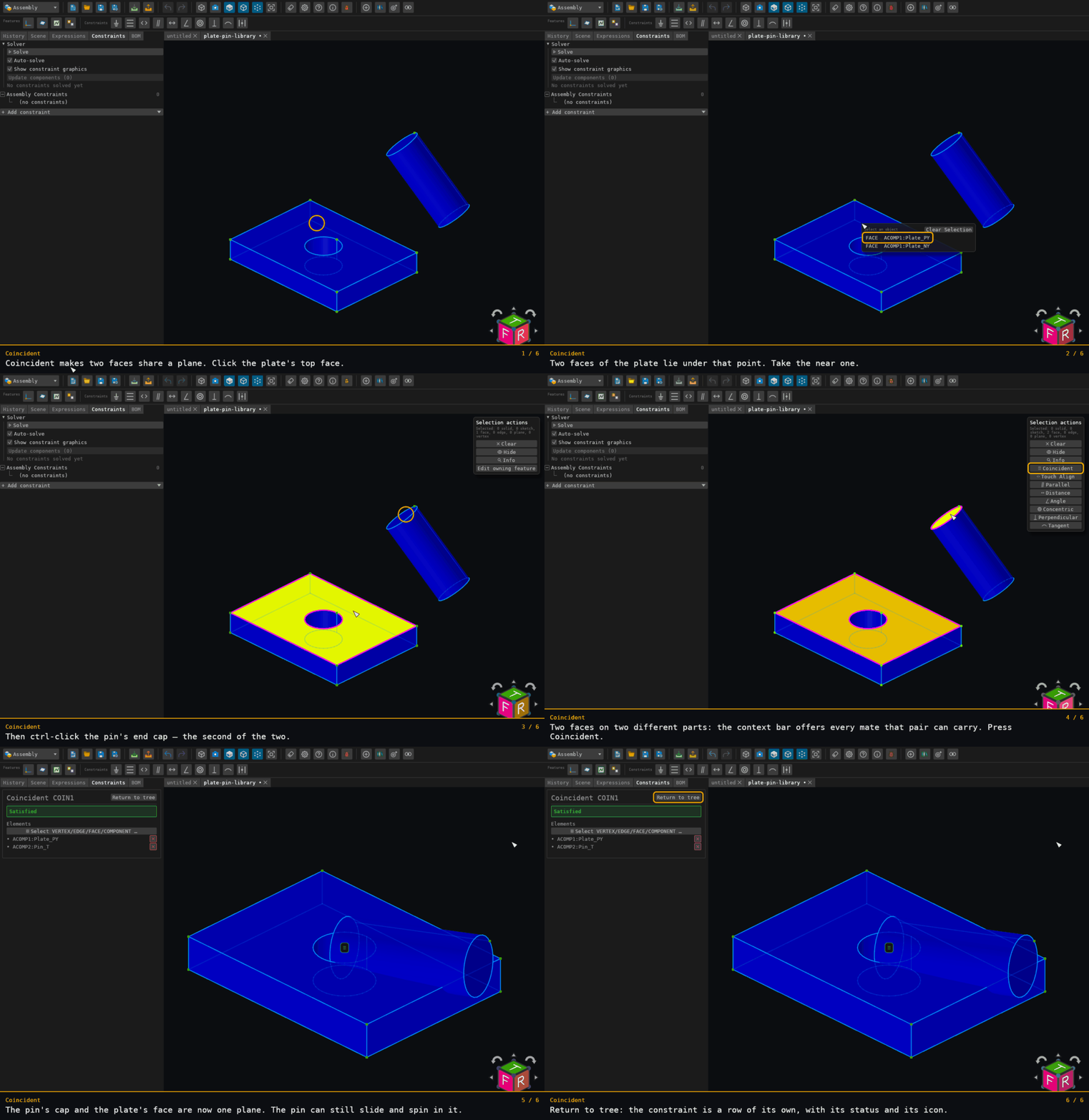
The walkthrough picks the plate's top face and the pin's end cap: two planar faces, so the two face centres are brought together. No pose is checked afterwards, only the solver's satisfied, because the pin's orientation is left free.
Offered for two elements on two distinct components — see where constraints are offered.