docs / constraints / Parallel
Parallel
Id prefix: PARA · Elements: exactly two · Selection filter: FACE / EDGE · Entry 3 of 16 in the panel's + dropdown
Parallel makes two direction-bearing elements point the same way. It is orientation-only: it turns the part and never moves it, which is the whole difference between it and Coincident or Touch Align. Reach for it when two things must stay square to one another but their separation is set elsewhere — usually by a Distance.
Parameters
| Parameter | ||
|---|---|---|
elements | two direction-bearing elements (face / edge) | The pair to make parallel. |
facing | aligned / opposed dropdown, unset on a new constraint | The two directions point the same way, or opposite ways. A new constraint takes the facing it is placed with and shows it here after its first solve; Flip picks the other one. |
Walkthrough
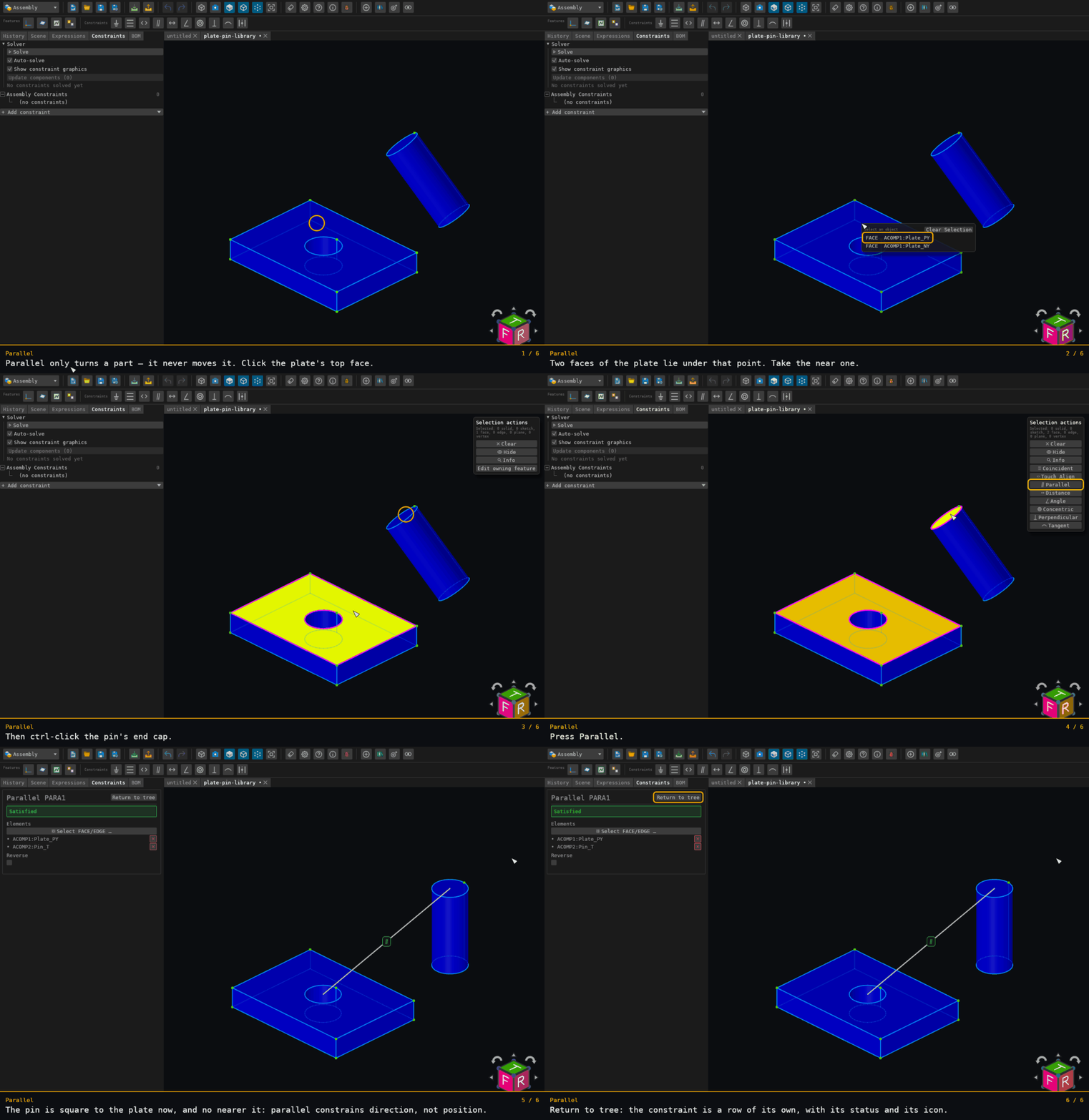
The plate's top face and the pin's end cap. After Parallel solves, the pin's translation is still the one it started with, to the last digit: the constraint turned the pin and moved it nowhere.
Offered for two elements on two distinct components — see where constraints are offered.